Envelope

Natural sounds change over time. One of the most common ways to emulate this phenomenon is to use an envelope, a control signal that modulates a synthesizer parameter or signal over time. They come in various shapes and sizes, with the ADSR envelope being the most popular type. They can and are used to control everything from amplitude to frequency to the index of an FM modulator to the shape of a grain, etc. The envelope is a synthesis fundamental.

In today’s example, I’m using a single segment envelope to modulate the amplitude of a triangle oscillator. The envelope starts at full volume, and over the duration of a note instance, fades to to silence. You can hear its affect on this except of Invention No. 1 by J.S. Bach.

Download line_envelope.csd here.

What would the same piece sound like without the envelope? To adequately demonstrate the envelope, it is necessary to listen to the same Bach excerpt using a non-enveloped triangle oscillator.

Download no_envelope.csd here.

As you can hear, that simple envelope in the first example makes a huge difference in the sound compared to the non-enveloped version. Not only does the envelope give the notes a percussive pluck-like quality, it eliminates those nasty pops and clicks you hear in the second listening example.

Synthesis Fall 2010

Four Fundamental Waveforms

There are four fundamental waveforms in synthesis: sine, triangle, square and sawtooth. If you don’t have a background in sound synthesis, you’ll soon discover that these four waveforms are everywhere; On faceplates of synthesizers as well as in much of the existing literature on sound design. Not only do they each have their own distinct timbres, but their physical shapes make them great for modulating synth parameters such as amplitude and frequency, which we’ll cover later.

The following examples plays each waveform at four different octaves:

Download the Csound example here.

*Note* I’m using vco2 to generate the triangle, square and sawtooth, which produces the band-limited equivalents of these three. I’ll get into what I mean later, but for now, you need not worry about this.

Synthesis Fall 2010

Ring Modulation

Starting today, I plan on focusing on the fundamental techniques of sound design. I won’t go too deep into the theory, as much of this information is described better elsewhere. My intent is to provide just enough of the basics so that you can start experimenting immediately, and hopefully start to recognize some of these synthesis design patterns as you study other instruments in the future. We begin with Ring Modulation.

The Computer Music Tutorial by Curtis Roads describes ring modulation as “simply the multiplication of two bipolar audio signals by one another.” Often times, one of the signals is a sine wave, though certainly not always. This technique is a quick and easy way for introducing inharmonic frequencies to a sound, and is quite popular in science fiction, as it is used in everything from 1950s era spaceships to robot voices. I’m personally fond of Daleks and Cybermen.

I created a simple example that ring modulates two sine wave oscillators together. The first oscillator has a constant frequency of 440Hz, while the second oscillator starts with a value of 1Hz, and doubles once a second until it plays the 2048Hz tone.

Download today’s example here.

Synthesis Fall 2010

Lots of Comments (lots of comments)

The first two weeks have been filled with perhaps too much information. Now is the perfect time to take a step back and really make sure the fundamentals are well covered, and properly understood.

To start, I’m presenting a simplified Csound example which contains lots of comments to help explain most of the things that are going on. I’ve also provided the block diagram above so you can get a sense of the signal flow of instr 1. Though I tried to be thorough, you should still have the Csound manual handy to help fill in anything missed.

If something doesn’t make sense, be sure you post a comment below, or send me an email.

Today’s example can be downloaded here.

Synthesis Fall 2010

An Overview of Csound Variable Types

Andrés Cabrera wrote an article for The Csound Journal called An Overview of Csound Variable Types. This is a great guide for demystifying that various signal types in Csound. There are siz types in all: audio (a), control (k), initialization (i), string (S), phase vocoder streaming (F) and spectral (w). Section II is especially useful as it provides various approaches for converting from one type to another, which you will find yourself doing from time to time.

Synthesis Fall 2010

Four ways for doing Twelve-tone Equal Temperament

As a general rule, Csound unit generators require that frequency is specified in terms of hertz, cycles per second. Though playing a middle C by typing a value of 261.63 is both unintuitive and impractical. There are several ways of tackling this issue within in Csound, and I’ll step you through a few in this example.

Download the source code.

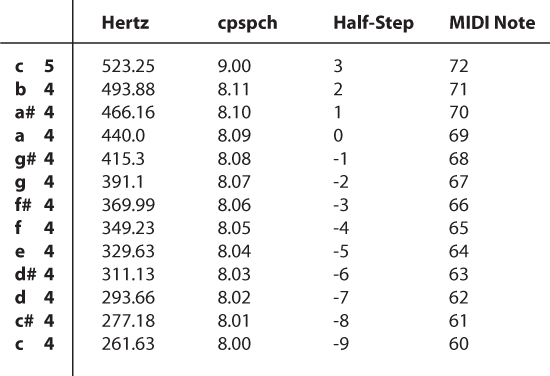
The easiest way for doing twelve-tone equal temperament in Csound is to utilize the cpspch opcode, which translates a value in octave point pitch-class notation (8ve.pc) to hertz. The value for A440 in 8ve.pc is represented as 8.09. The 8 represents the octave, while the 09 is the number of half steps above the C for the specified octave. Middle C is represented as 8.00.

Another way of doing this is by specifying a formula ourselves in the code. With instr 3, users can choose a pitch by specifying the number of half-steps away from A440. For example, if p4 equals 0, the instr will sound a pitch of 440Hz. A value of -9 will sound middle C.

MIDI is a well established format that has its own way of doing things. Instrument 4 uses a modified version of instr 3’s formula, so that it accepts MIDI note value. Middle C in MIDI is 60, and entering this value will in fact sound middle C.

Here are the four formulas used in the example csd:

ifreq = p4 ; Hertz
ipch = cpspch(p4) ; cpspch
ihalf_step = 440 * 2 ^ (p4 / 12) ; Half-step (relative to A440)
imidi_note = 440 * 2 ^ ((p4 - 69) / 12) ; MIDI note

Synthesis Fall 2010

Update: Steven Yi, creator of Blue (a music composition environment for Csound) and co-editor of The Csound Journal, correctly points out that cps2pch is more accurate for tuning than cpspch. Definitely worth knowing.

Atomic Fixin’s

[blip.tv ?posts_id=4167645&dest=-1]

Watch video at Blip.tv

Atomic Fixin’s is a boutique instrument I built with Processing and Csoundo. The synth engine is based on the principles used in the Atari 2600 video game console. I created this demo to get a sense of Csound instrument GUI design using Processing. This just happend to tie in nicely with yesterday’s post 2600 Synthesis. All in all, I would say I spent no more than 8 hours building this.

Download the source code here.

Synthesis Fall 2010

Using the Terminal

QuteCsound is the the easiest way to get up and running with Csound, with its friendly GUI and host of examples. Though it is not the only way to work with Csound. A strong alternative used by many is the command-line terminal. If you are into linux, than the terminal is probably a better match for you.

Jean-Luc wrote an article for The Csound Journal titled Working with the terminal in OSX: An absolute beginner’s guide. This will gently introduce you to the basics of using Csound from a command prompt and start to prepare you for concepts covered later in the semester, such as utilizing Csound as an audio batch processor. One note about the article, as of OS X 10.5, it is no longer necessary to add usr/local/bin to the path, rendering the second half of section II irrelevant; Csound will run in the terminal out of the box.

Synthesis Fall 2010

2600 Synthesis

We’re starting off week 2 of the class with an example of a vintage synthesis technique used in the classic Atari 2600 video game console.

Download: 2600_synthesis.csd

Inside the game unit is the TIA chip which is responsible for both the graphics and the audio. Instead of trying to create a perfect emulation of the synthesis engine, we’ve narrowed today’s instruments to two defining characteristics: waveform and frequency.

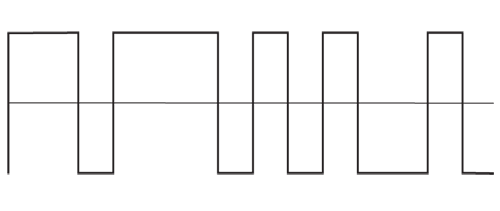
The waveform is a polypulse wave, which means it looks like a pulsewave, though with multiple high and low values within a single cycle waveform. A typical polypulse looks like this:

The Atari 2600 also has a very odd tuning system that is derived from a CPU clock and and a bit shift register that stores a waveform as zeros and ones. For example, if the clock is running at 31440 Hz, and you are using a register with 15 bits, the highest frequency produced with this particular register is 2096 Hz, calculated by dividing 31440 by 15. The frequency can be modified by dividing the clock with an integer. Dividing by 2, 3 and 4 would produce frequencies of 1048, 698.666 and 524 Hz. The formula is:

frequency = sampleRate / sizeOfRegister / division

For more on Atari 2600 audio, read the ATARI 2600 VCS SOUND FREQUENCY AND WAVEFORM GUIDE by Eckhard Stolberg.

Synthesis Fall 2010